


Table of Contents
Quick Answer: Packing electronics for moving safely means controlling movement, pressure, and static with the right materials and a clear process. Most damage happens when items shift inside boxes or screens take pressure during handling and transport.
Electronics are one of the easiest categories to get wrong during a move. A TV can crack from uneven pressure. A computer can develop internal problems without obvious exterior damage. In many cases, the issue starts with how the item was packed, not just how it was carried.
At Quantum Moving, this comes up regularly on residential and commercial moves across the Bay Area. Electronics are often packed last or treated like standard fragile items. That is usually where problems start.
Why Electronics Are Especially Vulnerable During a Move
Electronics do not always break in obvious ways. Some issues show up only after the move is over.
Common Causes of Damage
Most problems come down to a few predictable causes:
- Items shifting inside the box during transport
- Pressure applied to screens or exterior surfaces
- Exposure to static or moisture
A box can feel secure and still leave enough internal space for movement. During transport, that repeated shifting can affect internal components, especially in computers, monitors, and game consoles.
What Makes Electronics Different from Other Fragile Items
Electronics have internal parts that react to movement, pressure, and static. Circuit boards, connectors, and drives are more sensitive than most household items.
That is why damage is not always visible right away. A screen may arrive without a visible crack but later show display issues. A computer may power on normally and still have problems after the move.
Essential Packing Materials for Electronics
The materials you use directly affect how well electronics hold up during a move. Substitutes like towels or blankets can help with surface protection, but they usually do not provide the consistent support needed inside a box.
What to Use (and What to Avoid)
- Anti-static bubble wrap for sensitive components
- Foam padding to absorb impact
- Strong, properly sized boxes
- Secure tape and clear labeling
Materials that compress too easily can create uneven pressure and leave room for movement. That is a common reason screens and internal components get damaged.
For a broader breakdown, see how to pack fragile items safely for moving.
When Original Boxes Matter
Original boxes are designed to support electronics in specific areas and limit movement. When available, they are usually the best option.
Without them, the goal is to recreate that support as closely as possible. The item should fit securely, with padding on all sides and no room to shift.
Step-by-Step: How to Pack Electronics Safely
This process reflects how experienced movers reduce risk during packing and transport. Skipping steps is where many problems begin.
Step 1: Back Up and Prepare Devices
Back up important data before packing. If something is damaged in transit, recovering files can be difficult.
Remove batteries, accessories, and loose parts when possible. Fully power down each device before packing.
Step 2: Label and Organize Cables
Disorganized cables lead to extra handling during unpacking, which increases the chance of damage or lost parts.
Label each cable and group them by device. Keep them in separate bags so nothing gets mixed up.
This step is much easier with a system like labeling moving boxes for organized unpacking.
Step 3: Protect Screens and Components
Screens should have a flat protective layer before wrapping. This helps distribute pressure more evenly across the surface.
Wrap the item fully, but do not cinch materials down too tightly. Excess pressure can be just as damaging as impact.
Step 4: Cushion and Box Properly
Add padding to the bottom of the box, place the item inside, then fill all remaining space so nothing shifts.
If anything moves when you gently tilt the box, it needs more support before it is ready to go.
For a full plan, see this complete moving checklist.
How to Pack Specific Electronics
Different devices need different handling. Treating everything the same is a common reason damage happens.
How to Pack a TV or Monitor
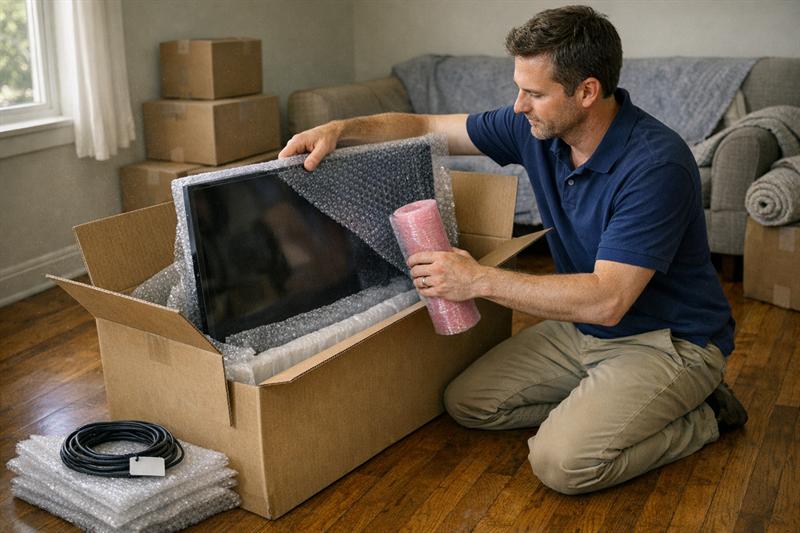
TVs and monitors should stay upright whenever possible. Laying them flat can place added pressure across the screen.
Use a protective layer over the screen, then wrap the unit and place it in a snug box with firm support around the edges.
Screen damage often happens during stacking, tight turns, or when too much pressure is applied during loading.
How to Pack Desktop Computers
Desktop computers are especially sensitive internally. Components can loosen or shift during transport.
Problems are not always immediate. A computer may turn on after the move and still develop issues from internal movement.
Secure removable internal parts when practical, and use firm padding to limit movement inside the box.
How to Pack Laptops and Tablets
These are easier to protect than larger electronics, but they still need careful packing. Keeping them with you instead of on the truck can reduce handling and stacking risk.
How to Pack Gaming Consoles and Accessories
Remove discs and pack accessories separately. Wrap the console and cushion it securely so it does not shift in transit.
Mistakes That Lead to Damage (and How to Avoid Them)
- Using boxes that are too large
- Skipping anti-static protection for sensitive items
- Placing heavy items on top of electronics
- Leaving empty space inside the box
These mistakes are common because they seem minor at first. In practice, movement inside the box can lead to repeated impact during transport.
They can also slow down the move and create avoidable setup problems later. For related planning issues, see common moving day delays and how to prevent them.
When to Consider Professional Packing Services
Some situations make electronics packing harder to manage on your own.
High-value items, complex setups, and longer moves leave less room for mistakes. Rushed packing is one of the most common reasons electronics get damaged.
If you are dealing with any of the following, it often makes sense to get help:
- Large TVs or multiple screens
- Custom desktop or office setups
- Long-distance or multi-day moves
- Limited time before moving day
These are the situations where proper materials and a careful packing process matter most. Using professional packing services can help reduce risk by keeping items supported, secure, and packed correctly from the start.
Moving Electronics in the Bay Area: Special Considerations
Local moving conditions can add another layer of difficulty that many people do not plan for.
Urban Moves and Tight Spaces
In the Bay Area, tight staircases, elevators, and narrow hallways are common. That increases how often electronics are lifted, turned, and repositioned.
A lot of damage happens in those transitions, not only in the truck.
Storage and Temperature Factors
Electronics are sensitive to heat, moisture, and temperature swings. Trucks and storage units can expose items to all three.
This becomes more of a concern during longer moves or when items sit before delivery.
Key Takeaways
- Most electronics damage comes from movement, pressure, and poor packing
- Proper materials and secure packing reduce risk significantly
- Different devices need different packing methods
- Empty space inside boxes is one of the most common packing problems
- Professional packing can be the safer choice for higher-risk moves
Conclusion
Electronics require more than basic packing. The main risks come from how they are handled, how they are supported, and how much they move during transport.
When those factors are overlooked, problems may not show up right away. Devices can appear fine at first, then develop issues later that are harder to trace back to packing.
That is why electronics are one of the categories where careful packing makes a clear difference.
If you are planning a move and want to reduce the risk of avoidable damage, working with Quantum Moving is a practical next step. The process is built around careful handling, proper materials, and keeping items stable from start to finish.
Frequently Asked Questions
What is the safest way to pack electronics for moving?
Use anti-static materials, firm cushioning, and correctly sized boxes. Most damage comes from movement or pressure inside the box. A structured packing approach can reduce those risks.
Can electronics be damaged by cold or heat during a move?
Yes. Temperature changes, moisture, and humidity can affect electronic components. This is more of a concern during long moves or storage, so limiting exposure matters.
Should electronics be transported in a car or moving truck?
Smaller and high-value items are often better kept in a personal vehicle. This can reduce stacking pressure, temperature exposure, and repeated handling.
Do I need anti-static bubble wrap for moving electronics?
It is a good choice for sensitive electronics and components. Anti-static materials help reduce the risk of static-related damage during packing and transport.
How do you pack cables and cords efficiently?
Label and group them by device, then store them in separate bags. This keeps setup simpler and helps avoid unnecessary handling later.
Is it better to hire professionals to pack electronics?
For larger, high-value, or more complex setups, it often is. Professional packing can help reduce common risks like movement, pressure, and improper materials.




Ready to plan your move?
Free, no-obligation estimate within 24 hours — local, long-distance and office moves across California.